Normal view

Automating and Optimizing Financial Signal Discovery with Multi-Agent Systems

21 May 2026 at 18:31
An illustration of a woman working in finance across multiple computer screens.In quantitative finance, researchers build algorithms to trade assets, derivatives, and other financial instruments. A key part of that work is finding signals:...An illustration of a woman working in finance across multiple computer screens.

In quantitative finance, researchers build algorithms to trade assets, derivatives, and other financial instruments. A key part of that work is finding signals: patterns in messy market data that may help predict future returns. These signals can come from price and volume data, economic indicators, fundamentals, or alternative sources like news sentiment. For years…

Source

Unlock Exascale Performance on NVIDIA GB200 NVL72 with Slurm Topology-Aware Job Scheduling

21 May 2026 at 17:32
Decorative image.As AI models grow in scale and complexity, realizing the full performance of modern accelerated infrastructure depends as much on how workloads are placed as on...Decorative image.

As AI models grow in scale and complexity, realizing the full performance of modern accelerated infrastructure depends as much on how workloads are placed as on the hardware itself. NVIDIA GB200 NVL72 delivers exascale compute in a single rack, unlocking real-time trillion-parameter models. Yet capturing that performance in a shared cluster requires schedulers that understand the system…

Source

Get Real-Time Visibility into GPU Usage Across Kubernetes Clusters

21 May 2026 at 18:00
Maximizing the value of AI infrastructure demands deep visibility into GPU utilization. Yet many platform teams running AI workloads on Kubernetes operate with...

Maximizing the value of AI infrastructure demands deep visibility into GPU utilization. Yet many platform teams running AI workloads on Kubernetes operate with limited visibility into how their GPUs are used. Most don’t know who’s consuming them, how much memory is in use, and whether Kubernetes pods are pending or silently idle. Without a signal, GPU fleets are routinely underutilized and slow to…

Source

Building Token‑Metered AI Services on Telco AI Factories

21 May 2026 at 15:30
Telcos around the world are building sovereign AI factories based on the NVIDIA Cloud Partner (NCP) reference architecture, giving governments, enterprises, and...

Telcos around the world are building sovereign AI factories based on the NVIDIA Cloud Partner (NCP) reference architecture, giving governments, enterprises, and startups access to in‑country AI infrastructure with the right controls, trust, and performance. But infrastructure alone doesn’t get you to high-margin, production-ready enterprise AI services. Model sizes and reasoning workloads…

Source

Mastering Agentic Techniques: AI Agent Customization

20 May 2026 at 20:00
Autonomous AI agents are taking on all types of work for businesses: routing logistics fleets, triaging support tickets, generating code, and orchestrating...

Autonomous AI agents are taking on all types of work for businesses: routing logistics fleets, triaging support tickets, generating code, and orchestrating multistep workflows. How do you take a general-purpose model and make it excel at your specific task? Customization provides an agent with the right capabilities. This post explains nine techniques for customizing AI agents…

Source

Add a Specialized Deep Research Skill to Agent Harnesses

The image depicts various digital screens showing concepts related to a "Skills Repository," "Software Architecture," "Big Data Schema," and "Training New Sub-Agent," suggesting a theme of self-evolving artificial intelligence capabilities.Agent harnesses like Claude Code, Codex, and LangChain Deep Agents are excellent orchestrators. They manage sessions, chain tools, execute code, and respond to...The image depicts various digital screens showing concepts related to a

Agent harnesses like Claude Code, Codex, and LangChain Deep Agents are excellent orchestrators. They manage sessions, chain tools, execute code, and respond to developer intent. But when these harnesses need to do deep research, such as multi-document synthesis, decision briefs backed by enterprise data, and long-horizon analysis with source attribution, the complexity of deep research shifts back…

Source

NVIDIA-Verified Agent Skills Provide Capability Governance for AI Agents

19 May 2026 at 23:40
Autonomous AI agents are becoming more capable. Open models, Model Context Protocol (MCP)-connected tools, and portable skills are also making agents easier to...

Autonomous AI agents are becoming more capable. Open models, Model Context Protocol (MCP)-connected tools, and portable skills are also making agents easier to extend.But scaling agent use with structural transparency and operational integrity requires more than runtime guardrails. Organizations and teams need to understand and trust the skills, or instructions, an agent is using.

Source

Mastering Agentic Techniques: AI Agent Evaluation

19 May 2026 at 20:00
Evaluating an AI model and evaluating an AI agent are related—but they answer fundamentally different questions. A model benchmark tests the capability of a...

Evaluating an AI model and evaluating an AI agent are related—but they answer fundamentally different questions. A model benchmark tests the capability of a foundation model (how well it understands language, follows instructions, or solves problems on static tasks). An agent evaluation tests the behavior of a system operating end-to-end—planning, calling tools, handling uncertainty…

Source

How the NVIDIA Vera Rubin Platform is Solving Agentic AI’s Scale-Up Problem

14 May 2026 at 19:24
Agentic inference has fundamentally changed the runtime dynamics of inference workloads by introducing non-deterministic trajectories—actions, observations,...

Agentic inference has fundamentally changed the runtime dynamics of inference workloads by introducing non-deterministic trajectories—actions, observations, and decisions that an AI agent produces while working through a task. These trajectories compound end-to-end latency across hundreds of inference requests per session. NVIDIA Vera Rubin NVL72 handles the bulk of that inference load as…

Source

Accelerated X-Ray Analysis for Nanoscale Imaging (XANI) of Novel Materials

13 May 2026 at 16:39
A massive-scale X-ray free-electron laser (XFEL) enables tracking structural and electron dynamics in novel systems, including fusion materials, semiconductors,...

A massive-scale X-ray free-electron laser (XFEL) enables tracking structural and electron dynamics in novel systems, including fusion materials, semiconductors, batteries, and catalysis. It produces ultrashort X-ray pulses that can record the movements of atoms and electrons. These instruments can detect the smallest change in material structure caused by defects and other influences.

Source

Transform Video Into Instantly Searchable, Actionable Intelligence with AI Agents and Skills 

13 May 2026 at 18:00
In today’s data-driven world, organizations increasingly rely on video to capture critical information, yet extracting meaningful, real-time insights from...

In today’s data-driven world, organizations increasingly rely on video to capture critical information, yet extracting meaningful, real-time insights from massive amounts of footage remains a challenge. NVIDIA Metropolis Blueprint for video search and summarization (VSS) overcomes this hurdle by transforming millions of live video streams or hours of recorded video into instantly searchable…

Source

How to Eliminate Pipeline Friction in AI Model Serving

12 May 2026 at 18:00
The path from a trained AI model to production should be smooth, but rarely is. Many teams invest weeks fine-tuning models, only to discover that exporting to a...

The path from a trained AI model to production should be smooth, but rarely is. Many teams invest weeks fine-tuning models, only to discover that exporting to a deployment format breaks layers, input shapes cause runtime failures, or version mismatches silently degrade performance. These issues are collectively known as pipeline friction, and they cost organizations time, money…

Source

Introducing NVIDIA Fleet Intelligence for Real-Time GPU Fleet Visibility and Optimization

11 May 2026 at 19:44
The compute capability of large GPU fleets presents unprecedented opportunities to innovate and provide value to customers in record time. Yet these...

The compute capability of large GPU fleets presents unprecedented opportunities to innovate and provide value to customers in record time. Yet these advancements come with a variety of challenges. At scale, teams are juggling heterogeneous hardware, fast‑moving software stacks, tight power envelopes, and spiky, multitenant workloads. A single hotspot, misconfigured driver, or subtle hardware fault…

Source

Improving Bash Generation in Small Language Models with Grammar-Constrained Decoding

8 May 2026 at 17:13
Bash is one of the most flexible and powerful interfaces exposed to AI agents. In the right system, a model that emits grep, curl, tar, or a shell pipeline is...

Bash is one of the most flexible and powerful interfaces exposed to AI agents. In the right system, a model that emits , , , or a shell pipeline is producing an executable action that can read files, mutate a workspace, open network connections, and chain tools together. For the NVIDIA AI Red Team, this makes command generation a useful research target. If smaller language models can be guided…

Source

Streaming Tokens and Tools: Multi-Turn Agentic Harness Support in NVIDIA Dynamo 

8 May 2026 at 15:59
An agentic exchange must preserve a structured interaction: assistant turns interleave reasoning with one or more tool calls, and subsequent user turns return...

An agentic exchange must preserve a structured interaction: assistant turns interleave reasoning with one or more tool calls, and subsequent user turns return the corresponding tool results to the model context. Reasoning replay is model- and turn-dependent: some reasoning should be retained, while some should be dropped. The inference engine is responsible for supporting this more expressive…

Source

Achieving Peak System and Workload Efficiency on NVIDIA GB200 NVL72 with Slurm Block Scheduling

7 May 2026 at 21:20
NVIDIA GB200 NVL72 introduces a fundamentally new way to build GPU clusters by extending NVIDIA NVLink coherence across an entire rack. This design enables...

NVIDIA GB200 NVL72 introduces a fundamentally new way to build GPU clusters by extending NVIDIA NVLink coherence across an entire rack. This design enables exascale performance, but it also changes the assumptions that many scheduling systems were built on. As a result, “rack-scale locality” becomes a hard constraint. When workloads cross domain boundaries, performance drops sharply…

Source

Model Quantization: Post-Training Quantization Using NVIDIA Model Optimizer

7 May 2026 at 21:18
This post is the second of a three-part series. See also Model Quantization: Concepts, Methods, and Why It Matters and Model Quantization: Turn FP8 Checkpoints...

This post is the second of a three-part series. See also Model Quantization: Concepts, Methods, and Why It Matters and Model Quantization: Turn FP8 Checkpoints into High-Performance Inference Engines with NVIDIA TensorRT. Model quantization is an effective method to reduce VRAM usage and improve inference performance on consumer devices such as NVIDIA GeForce RTX GPUs.

Source

Real-Time Performance Monitoring and Faster Debugging with NCCL Inspector and Prometheus

7 May 2026 at 16:02
Decorative image.Distributed deep learning depends on fast, reliable GPU-to-GPU communication using the NVIDIA Collective Communication Library (NCCL). When training slows down,...Decorative image.

Distributed deep learning depends on fast, reliable GPU-to-GPU communication using the NVIDIA Collective Communication Library (NCCL). When training slows down, it becomes challenging to determine why and what to do next. A problem can span computation, communication, a specific rank, or underlying hardware. NVIDIA NCCL Inspector accelerates triaging by providing a lightweight and continuous…

Source

Announcing Amazon SageMaker Inference for custom Amazon Nova models

Since we launched Amazon Nova customization in Amazon SageMaker AI at AWS NY Summit 2025, customers have been asking for the same capabilities with Amazon Nova as they do when they customize open weights models in Amazon SageMaker Inference. They also wanted have more control and flexibility in custom model inference over instance types, auto-scaling policies, context length, and concurrency settings that production workloads demand.

Today, we’re announcing the general availability of custom Nova model support in Amazon SageMaker Inference, a production-grade, configurable, and cost-efficient managed inference service to deploy and scale full-rank customized Nova models. You can now experience an end-to-end customization journey to train Nova Micro, Nova Lite, and Nova 2 Lite models with reasoning capabilities using Amazon SageMaker Training Jobs or Amazon HyperPod and seamlessly deploy them with managed inference infrastructure of Amazon SageMaker AI.

With Amazon SageMaker Inference for custom Nova models, you can reduce inference cost through optimized GPU utilization using Amazon Elastic Compute Cloud (Amazon EC2) G5 and G6 instances over P5 instances, auto-scaling based on 5-minute usage patterns, and configurable inference parameters. This feature enables deployment of customized Nova models with continued pre-training, supervised fine-tuning, or reinforcement fine-tuning for your use cases. You can also set advanced configurations about context length, concurrency, and batch size for optimizing the latency-cost-accuracy tradeoff for your specific workloads.

Let’s see how to deploy customized Nova models on SageMaker AI real-time endpoints, configure inference parameters, and invoke your models for testing.

Deploy custom Nova models in SageMaker Inference
At AWS re:Invent 2025, we introduced new serverless customization in Amazon SageMaker AI for popular AI models including Nova models. With a few clicks, you can seamlessly select a model and customization technique, and handle model evaluation and deployment. If you already have a trained custom Nova model artifact, you can deploy the models on SageMaker Inference through the SageMaker Studio or SageMaker AI SDK.

In the SageMaker Studio, choose a trained Nova model in Models in your models in the Models menu. You can deploy the model by choosing Deploy button, SageMaker AI and Create new endpoint.

Choose the endpoint name, instance type, and advanced options such as instance count, max instance count, permission and networking, and Deploy button. At GA launch, you can use g5.12xlarge, g5.24xlarge, g5.48xlarge, g6.12xlarge, g6.24xlarge, g6.48xlarge, and p5.48xlarge instance types for the Nova Micro model, g5.48xlarge, g6.48xlarge, and p5.48xlarge for the Nova Lite model, and p5.48xlarge for the Nova 2 Lite model.

Creating your endpoint requires time to provision the infrastructure, download your model artifacts, and initialize the inference container.

After model deployment completes and the endpoint status shows InService, you can perform real-time inference using the new endpoint. To test the model, choose the Playground tab and input your prompt in the Chat mode.

You can also use the SageMaker AI SDK to create two resources: a SageMaker AI model object that references your Nova model artifacts, and an endpoint configuration that defines how the model will be deployed.

The following code sample creates a SageMaker AI model that references your Nova model artifacts. For supported container images by Region, refer table lists the container image URIs:

# Create a SageMaker AI model
    model_response = sagemaker.create_model(
        ModelName= 'Nova-micro-ml-g5-12xlarge',
        PrimaryContainer={
            'Image': '708977205387.dkr.ecr.us-east-1.amazonaws.com/nova-inference-repo:v1.0.0',
            'ModelDataSource': {
                'S3DataSource': {
                   'S3Uri': 's3://your-bucket-name/path/to/model/artifacts/',
                   'S3DataType': 'S3Prefix',
                   'CompressionType': 'None'
                }
            },
            # Model Parameters
            'Environment': {
                'CONTEXT_LENGTH': 8000,
                'MAX_CONCURRENCY': 16,
                'DEFAULT_TEMPERATURE': 0.0,
                'DEFAULT_TOP_P': 1.0
            }
        },
        ExecutionRoleArn=SAGEMAKER_EXECUTION_ROLE_ARN,
        EnableNetworkIsolation=True
    )
    print("Model created successfully!")

Next, create an endpoint configuration that defines your deployment infrastructure and deploy your Nova model by creating a SageMaker AI real-time endpoint. This endpoint will host your model and provide a secure HTTPS endpoint for making inference requests.

# Create Endpoint Configuration
    production_variant = {
        'VariantName': 'primary',
        'ModelName': 'Nova-micro-ml-g5-12xlarge',
        'InitialInstanceCount': 1,
        'InstanceType': 'ml.g5.12xlarge',
    }
    
    config_response = sagemaker.create_endpoint_config(
        EndpointConfigName= 'Nova-micro-ml-g5-12xlarge-Config',
        ProductionVariants= production_variant
    )
    print("Endpoint configuration created successfully!")
    
# Deploy your Noval model
    endpoint_response = sagemaker.create_endpoint(
        EndpointName= 'Nova-micro-ml-g5-12xlarge-endpoint',
        EndpointConfigName= 'Nova-micro-ml-g5-12xlarge-Config'
    )
    print("Endpoint creation initiated successfully!")

After the endpoint is created, you can send inference requests to generate predictions from your custom Nova model. Amazon SageMaker AI supports synchronous endpoints for real-time with streaming/non-streaming modes and asynchronous endpoints for batch processing.

For example, the following code creates streaming completion format for text generation:

# Streaming chat request with comprehensive parameters
streaming_request = {
"messages": [
        {"role": "user", "content": "Compare our Q4 2025 actual spend against budget across all departments and highlight variances exceeding 10%"}
    ],
    "max_tokens": 512,
    "stream": True,
    "temperature": 0.7,
    "top_p": 0.95,
    "top_k": 40,
    "logprobs": True,
    "top_logprobs": 2,
    "reasoning_effort": "low",  # Options: "low", "high"
    "stream_options": {"include_usage": True}
}

invoke_nova_endpoint(streaming_request)

def invoke_nova_endpoint(request_body):
"""
    Invoke Nova endpoint with automatic streaming detection.
    
    Args:
        request_body (dict): Request payload containing prompt and parameters
    
    Returns:
        dict: Response from the model (for non-streaming requests)
        None: For streaming requests (prints output directly)
    """
    body = json.dumps(request_body)
    is_streaming = request_body.get("stream", False)
    
    try:
        print(f"Invoking endpoint ({'streaming' if is_streaming else 'non-streaming'})...")
        
        if is_streaming:
            response = runtime_client.invoke_endpoint_with_response_stream(
                EndpointName=ENDPOINT_NAME,
                ContentType='application/json',
                Body=body
            )
            
            event_stream = response['Body']
            for event in event_stream:
                if 'PayloadPart' in event:
                    chunk = event['PayloadPart']
                    if 'Bytes' in chunk:
                        data = chunk['Bytes'].decode()
                        print("Chunk:", data)
        else:
            # Non-streaming inference
            response = runtime_client.invoke_endpoint(
                EndpointName=ENDPOINT_NAME,
                ContentType='application/json',
                Accept='application/json',
                Body=body
            )
            
            response_body = response['Body'].read().decode('utf-8')
            result = json.loads(response_body)
            print("✅ Response received successfully")
            return result
    
    except ClientError as e:
        error_code = e.response['Error']['Code']
        error_message = e.response['Error']['Message']
        print(f"❌ AWS Error: {error_code} - {error_message}")
    except Exception as e:
        print(f"❌ Unexpected error: {str(e)}")

To use full code examples, visit Getting started with customizing Nova models on SageMaker AI. To learn more about best practices on deploying and managing models, visit Best practices for SageMaker AI.

Now available
Amazon SageMaker Inference for custom Nova models is available today in US East (N. Virginia) and US West (Oregon) AWS Regions. For Regional availability and a future roadmap, visit the AWS Capabilities by Region.

The feature supports Nova Micro, Nova Lite, and Nova 2 Lite models with reasoning capabilities, running on EC2 G5, G6, and P5 instances with auto-scaling support. You pay only for the compute instances you use, with per-hour billing and no minimum commitments. For more information, visit Amazon SageMaker AI Pricing page.

Give it a try in Amazon SageMaker AI console and send feedback to AWS re:Post for SageMaker or through your usual AWS Support contacts.

Channy

Amazon Bedrock AgentCore adds quality evaluations and policy controls for deploying trusted AI agents

Updated on March 3, 2026Policy in Amazon Bedrock AgentCore is now generally available.
Updated on March 31, 2026Amazon Bedrock AgentCore Evaluations is now generally available.


Today, we’re announcing new capabilities in Amazon Bedrock AgentCore to further remove barriers holding AI agents back from production. Organizations across industries are already building on AgentCore, the most advanced agentic platform to build, deploy, and operate highly capable agents securely at any scale. In just 5 months since preview, the AgentCore SDK has been downloaded over 2 million times. For example:

  • PGA TOUR, a pioneer and innovation leader in sports has built a multi-agent content generation system to create articles for their digital platforms. The new solution, built on AgentCore, enables the PGA TOUR to provide comprehensive coverage for every player in the field, by increasing content writing speed by 1,000 percent while achieving a 95 percent reduction in costs.
  • Independent software vendors (ISVs) like Workday are building the software of the future on AgentCore. AgentCore Code Interpreter provides Workday Planning Agent with secure data protection and essential features for financial data exploration. Users can analyze financial and operational data through natural language queries, making financial planning intuitive and self-driven. This capability reduces time spent on routine planning analysis by 30 percent, saving approximately 100 hours per month.
  • Grupo Elfa, a Brazilian distributor and retailer, relies on AgentCore Observability for complete audit traceability and real-time metrics of their agents, transforming their reactive processes into proactive operations. Using this unified platform, their sales team can handle thousands of daily price quotes while the organization maintains full visibility of agent decisions, helping achieve 100 percent traceability of agent decisions and interactions, and reduced problem resolution time by 50 percent.

As organizations scale their agent deployments, they face challenges around implementing the right boundaries and quality checks to confidently deploy agents. The autonomy that makes agents powerful also makes them hard to confidently deploy at scale, as they might access sensitive data inappropriately, make unauthorized decisions, or take unexpected actions. Development teams must balance enabling agent autonomy while ensuring they operate within acceptable boundaries and with the quality you require to put them in front of customers and employees.

The new capabilities available today take the guesswork out of this process and help you build and deploy trusted AI agents with confidence:

  • Policy in AgentCore (Preview) – Defines clear boundaries for agent actions by intercepting AgentCore Gateway tool calls before they run using policies with fine-grained permissions.
  • AgentCore Evaluations (Preview) – Monitors the quality of your agents based on real-world behavior using built-in evaluators for dimensions such as correctness and helpfulness, plus custom evaluators for business-specific requirements.

We’re also introducing features that expand what agents can do:

  • Episodic functionality in AgentCore Memory – A new long-term strategy that helps agents learn from experiences and adapt solutions across similar situations for improved consistency and performance in similar future tasks.
  • Bidirectional streaming in AgentCore Runtime – Deploys voice agents where both users and agents can speak simultaneously following a natural conversation flow.

Policy in AgentCore for precise agent control
Policy gives you control over the actions agents can take and are applied outside of the agent’s reasoning loop, treating agents as autonomous actors whose decisions require verification before reaching tools, systems, or data. It integrates with AgentCore Gateway to intercept tool calls as they happen, processing requests while maintaining operational speed, so workflows remain fast and responsive.

You can create policies using natural language or directly use Cedar—an open source policy language for fine-grained permissions—simplifying the process to set up, understand, and audit rules without writing custom code. This approach makes policy creation accessible to development, security, and compliance teams who can create, understand, and audit rules without specialized coding knowledge.

The policies operate independently of how the agent was built or which model it uses. You can define which tools and data agents can access—whether they are APIs, AWS Lambda functions, Model Context Protocol (MCP) servers, or third-party services—what actions they can perform, and under what conditions.

Teams can define clear policies once and apply them consistently across their organization. With policies in place, developers gain the freedom to create innovative agentic experiences, and organizations can deploy their agents to act autonomously while knowing they’ll stay within defined boundaries and compliance requirements.

Using Policy in AgentCore
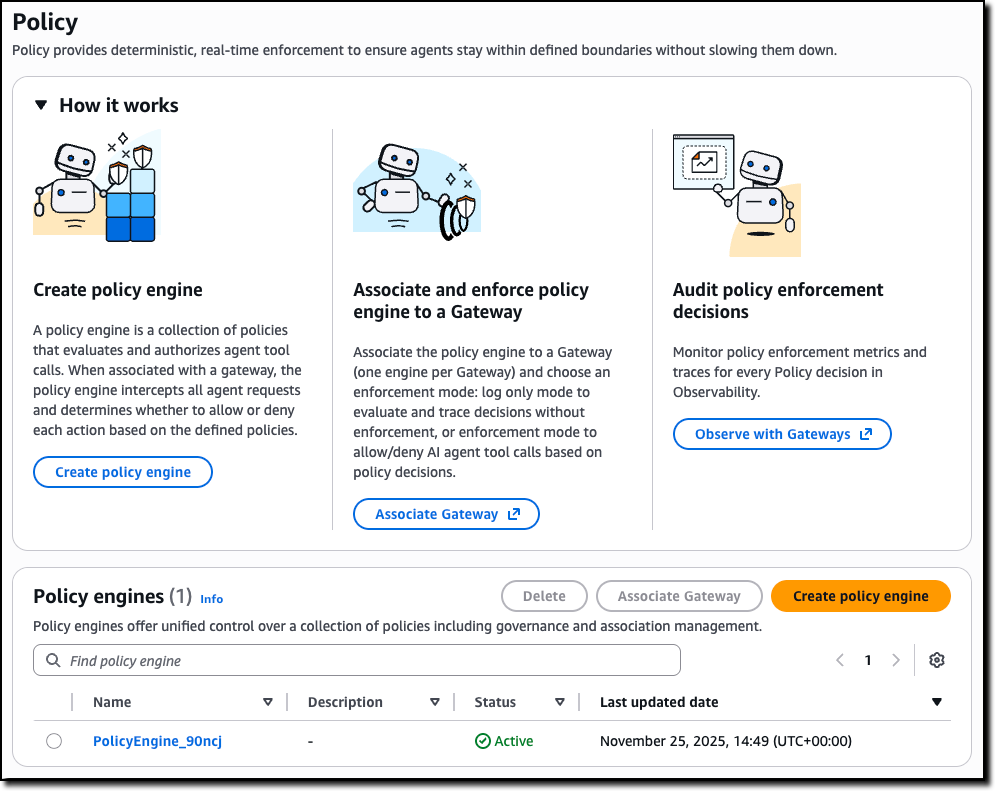
You can start by creating a policy engine in the new Policy section of the AgentCore console and associate it with one or more AgentCore gateways.

A policy engine is a collection of policies that are evaluated at the gateway endpoint. When associating a gateway with a policy engine, you can choose whether to enforce the result of the policy—effectively permitting or denying access to a tool call—or to only emit logs. Using logs helps you test and validate a policy before enabling it in production.

Then, you can define the policies to apply to have granular control over access to the tools offered by the associated AgentCore gateways.

Amazon Bedrock AgentCore Policy console

To create a policy, you can start with a natural language description (that should include information of the authentication claims to use) or directly edit Cedar code.

Amazon Bedrock AgentCore Policy add

Natural language-based policy authoring provides a more accessible way for you to create fine-grained policies. Instead of writing formal policy code, you can describe rules in plain English. The system interprets your intent, generates candidate policies, validates them against the tool schema, and uses automated reasoning to check safety conditions—identifying prompts that are overly permissive, overly restrictive, or contain conditions that can never be satisfied.

Unlike generic large language model (LLM) translations, this feature understands the structure of your tools and generates policies that are both syntactically correct and semantically aligned with your intent, while flagging rules that cannot be enforced. It is also available as a Model Context Protocol (MCP) server, so you can author and validate policies directly in your preferred AI-assisted coding environment as part of your normal development workflow. This approach reduces onboarding time and helps you write high-quality authorization rules without needing Cedar expertise.

The following sample policy uses information from the OAuth claims in the JWT token used to authenticate to an AgentCore gateway (for the role) and the arguments passed to the tool call (context.input) to validate access to the tool processing a refund. Only an authenticated user with the refund-agent role can access the tool but for amounts (context.input.amount) lower than $200 USD.

permit(
  principal is AgentCore::OAuthUser,
  action == AgentCore::Action::"RefundTool__process_refund",
  resource == AgentCore::Gateway::"<GATEWAY_ARN>"
)
when {
  principal.hasTag("role") &&
  principal.getTag("role") == "refund-agent" &&
  context.input.amount < 200
};

AgentCore Evaluations for continuous, real-time quality intelligence
AgentCore Evaluations is a fully managed service that helps you continuously monitor and analyze agent performance based on real-world behavior. With AgentCore Evaluations, you can use built-in evaluators for common quality dimensions such as correctness, helpfulness, tool selection accuracy, safety, goal success rate, and context relevance. You can also create custom model-based scoring systems configured with your choice of prompt and model for business-tailored scoring while the service samples live agent interactions and scores them continuously.

All results from AgentCore Evaluations are visualized in Amazon CloudWatch alongside AgentCore Observability insights, providing one place for unified monitoring. You can also set up alerts and alarms on the evaluation scores to proactively monitor agent quality and respond when metrics fall outside acceptable thresholds.

You can use AgentCore Evaluations during the testing phase where you can check an agent against the baseline before deployment to stop faulty versions from reaching users, and in production for continuous improvement of your agents. When quality metrics drop below defined thresholds—such as a customer service agent satisfaction declining or politeness scores dropping by more than 10 percent over an 8-hour period—the system triggers immediate alerts, helping to detect and address quality issues faster.

Using AgentCore Evaluations
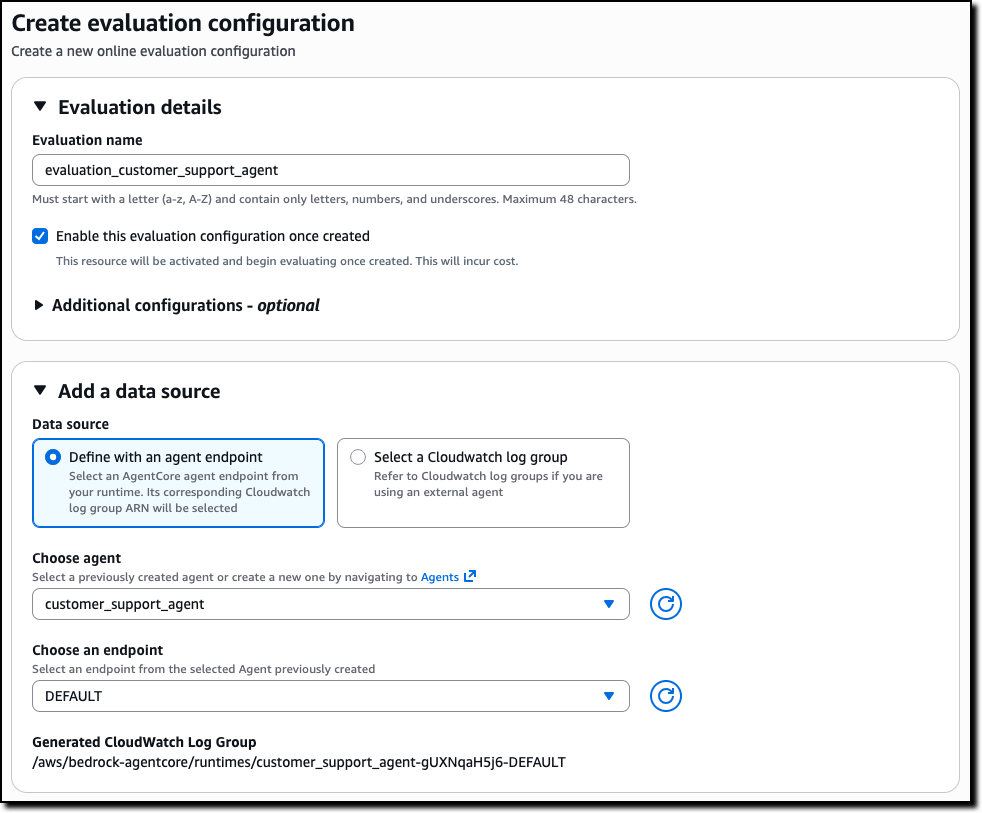
You can create an online evaluation in the new Evaluations section of the AgentCore console. You can use as data source an AgentCore agent endpoint or a CloudWatch log group used by an external agent. For example, I use here the same sample customer support agent I shared when we introduced AgentCore in preview.

Amazon Bedrock AgentCore Evaluations source

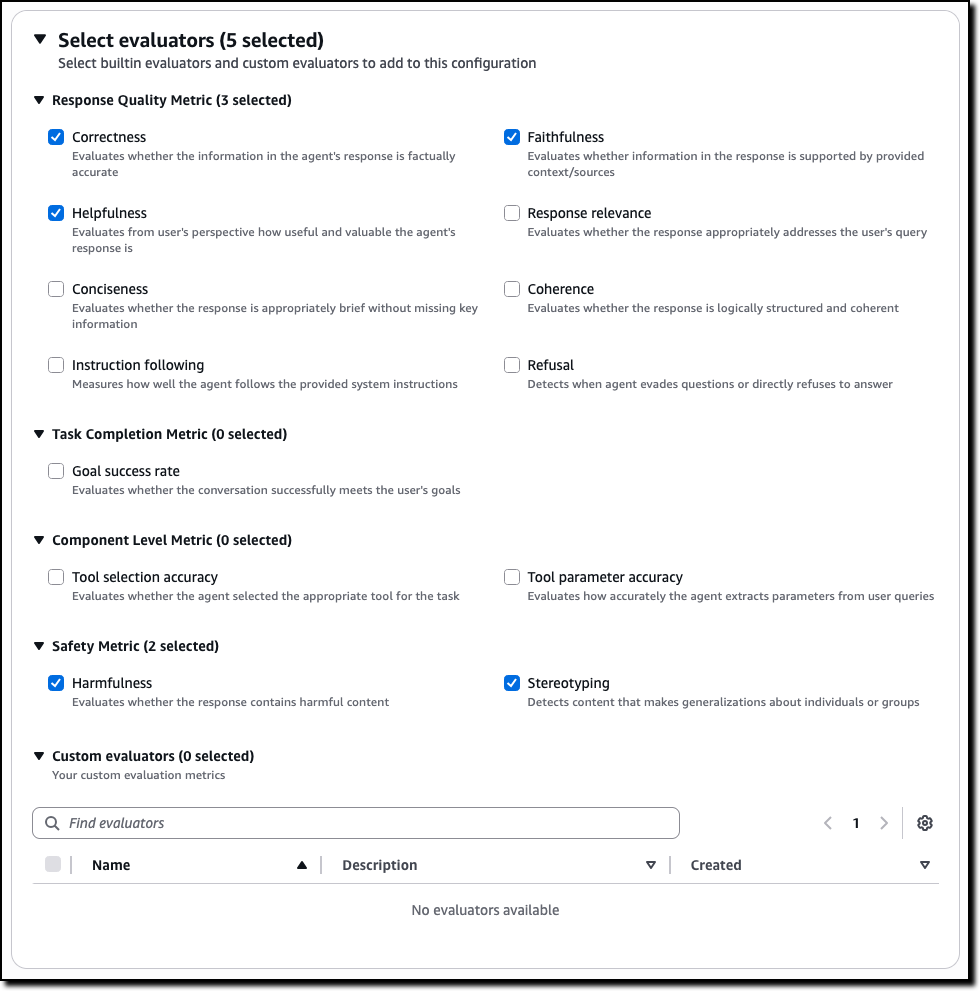
Then, you can select the evaluators to use, including custom evaluators that you can define starting from the existing templates or build from scratch.

Amazon Bedrock AgentCore Evaluations source

For example, for a customer support agent, you can select metrics such as:

  • Correctness – Evaluates whether the information in the agent’s response is factually accurate
  • Faithfulness – Evaluates whether information in the response is supported by provided context/sources
  • Helpfulness – Evaluates from user’s perspective how useful and valuable the agent’s response is
  • Harmfulness – Evaluates whether the response contains harmful content
  • Stereotyping – Detects content that makes generalizations about individuals or groups

The evaluators for tool selection and tool parameter accuracy can help you understand if an agent is choosing the right tool for a task and extracting the correct parameters from the user queries.

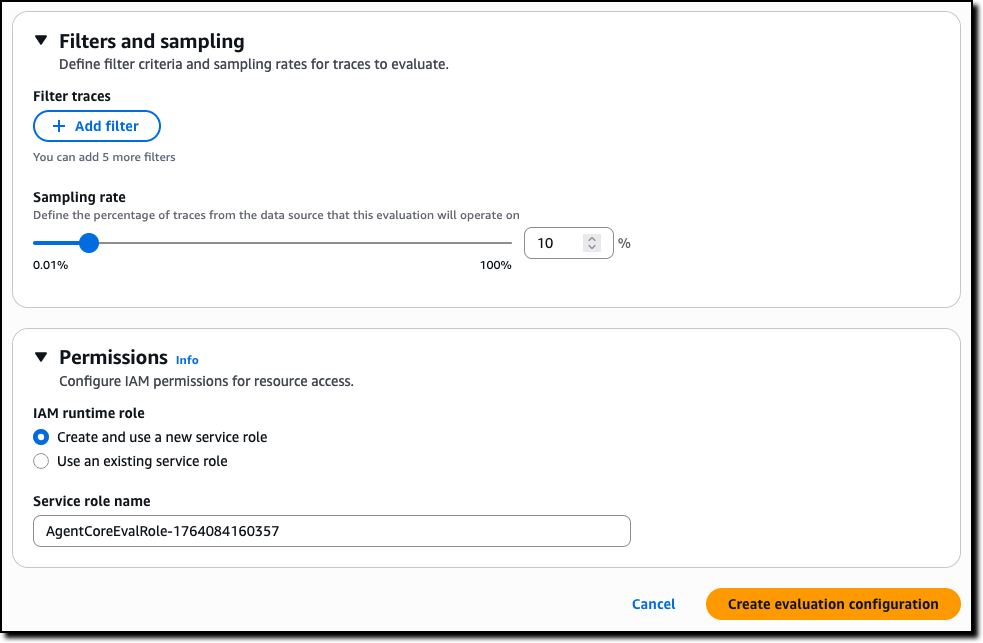
To complete the creation of the evaluation, you can choose the sampling rate and optional filters. For permissions, you can create a new AWS Identity and Access Management (IAM) service role or pass an existing one.

Amazon Bedrock AgentCore Evaluations create

The results are published, as they are evaluated, on Amazon CloudWatch in the AgentCore Observability dashboard. You can choose any of the bar chart sections to see the corresponding traces and gain deeper insight into the requests and responses behind that specific evaluation.

Amazon AgentCore Evaluations results

Because the results are in CloudWatch, you can use all of its feature to create, for example, alarms and automations.

Creating custom evaluators in AgentCore Evaluations
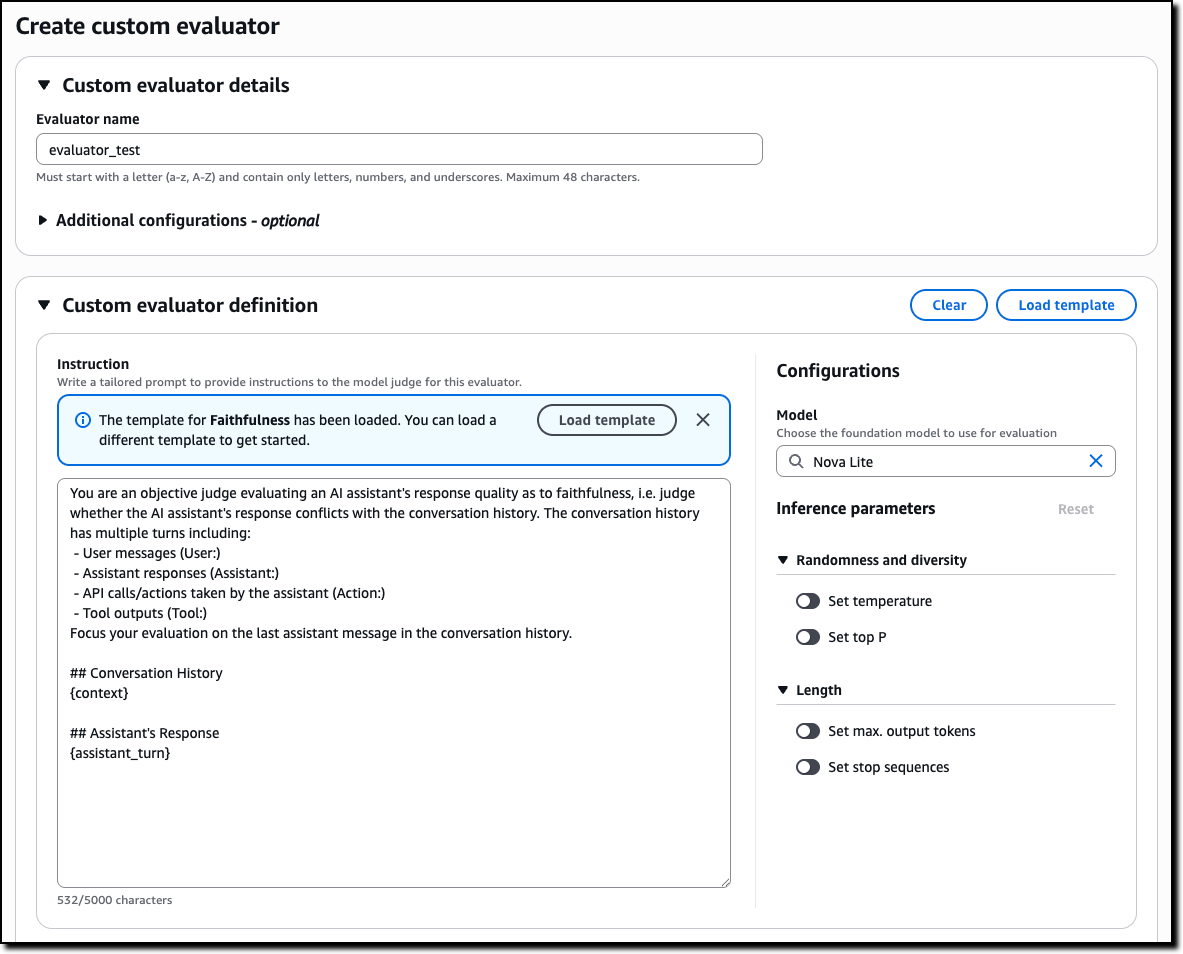
Custom evaluators allow you to define business-specific quality metrics tailored to your agent’s unique requirements. To create a custom evaluator, you provide the model to use as a judge, including inference parameters such as temperature and max output tokens, and a tailored prompt with the judging instructions. You can start from the prompt used by one of the built-in evaluators or enter a new one.

AgentCore Evaluations create custom evaluator

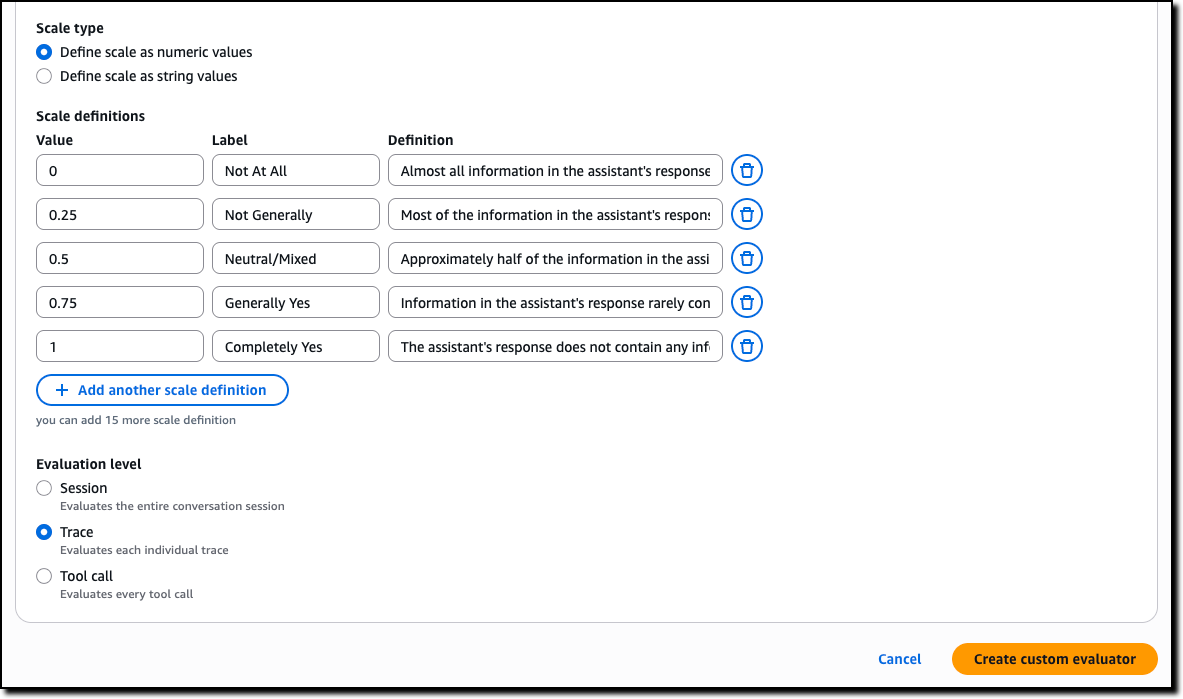
Then, you define the scale to produce in output. It can be either numeric values or custom text labels that you define. Finally, you configure whether the evaluation is computed by the model on single traces, full sessions, or for each tool call.

AgentCore Evaluations custom evaluator scale

AgentCore Memory episodic functionality for experience-based learning
AgentCore Memory, a fully managed service that gives AI agents the ability to remember past interactions, now includes a new long-term memory strategy that gives agents the ability to learn from past experiences and apply those lessons to provide more helpful assistance in future interactions.

Consider booking travel with an agent: over time, the agent learns from your booking patterns—such as the fact that you often need to move flights to later times when traveling for work due to client meetings. When you start your next booking involving client meetings, the agent proactively suggests flexible return options based on these learned patterns. Just like an experienced assistant who learns your specific travel habits, agents with episodic memory can now recognize and adapt to your individual needs.

When you enable the new episodic functionality, AgentCore Memory captures structured episodes that record the context, reasoning process, actions taken, and outcomes of agent interactions, while a reflection agent analyzes these episodes to extract broader insights and patterns. When facing similar tasks, agents can retrieve these learnings to improve decision-making consistency and reduce processing time. This reduces the need for custom instructions by including in the agent context only the specific learnings an agent needs to complete a task instead of a long list of all possible suggestions.

AgentCore Runtime bidirectional streaming for more natural conversations
With AgentCore Runtime, you can deploy agentic applications with few lines of code. To simplify deploying conversational experiences that feel natural and responsive, AgentCore Runtime now supports bidirectional streaming. This capability enables voice agents to listen and adapt while users speak, so that people can interrupt agents mid-response and have the agent immediately adjust to the new context—without waiting for the agent to finish its current output. Rather than traditional turn-based interaction where users must wait for complete responses, bidirectional streaming creates flowing, natural conversations where agents dynamically change their response based on what the user is saying.

Building these conversational experiences from the ground up requires significant engineering effort to handle the complex flow of simultaneous communication. Bidirectional streaming simplifies this by managing the infrastructure needed for agents to process input while generating output, handling interruptions gracefully, and maintaining context throughout dynamic conversation shifts. You can now deploy agents that naturally adapt to the fluid nature of human conversation—supporting mid-thought interruptions, context switches, and clarifications without losing the thread of the interaction.

Things to know
Amazon Bedrock AgentCore, including the preview of Policy, is available in the US East (N. Virginia), US West (Oregon), Asia Pacific (Mumbai, Singapore, Sydney, Tokyo), and Europe (Frankfurt, Ireland) AWS Regions . The preview of AgentCore Evaluations is available in the US East (N. Virginia), US West (Oregon), Asia Pacific (Sydney), and Europe (Frankfurt) Regions. For Regional availability and future roadmap, visit AWS Capabilities by Region.

With AgentCore, you pay for what you use with no upfront commitments. For detailed pricing information, visit the Amazon Bedrock pricing page. AgentCore is also a part of the AWS Free Tier that new AWS customers can use to get started at no cost and explore key AWS services.

These new features work with any open source framework such as CrewAI, LangGraph, LlamaIndex, and Strands Agents, and with any foundation model. AgentCore services can be used together or independently, and you can get started using your favorite AI-assisted development environment with the AgentCore open source MCP server.

To learn more and get started quickly, visit the AgentCore Developer Guide.

Danilo

Editors Note: 1/16/25- AgentCore Evaluation is not available in US East (Ohio). Removed from region list.

❌