❌

Normal view

Amazon Bedrock adds reinforcement fine-tuning simplifying how developers build smarter, more accurate AI models

Organizations face a challenging trade-off when adapting AI models to their specific business needs: settle for generic models that produce average results, or tackle the complexity and expense of advanced model customization. Traditional approaches force a choice between poor performance with smaller models or the high costs of deploying larger model variants and managing complex infrastructure. Reinforcement fine-tuning is an advanced technique that trains models using feedback instead of massive labeled datasets, but implementing it typically requires specialized ML expertise, complicated infrastructure, and significant investmentβ€”with no guarantee of achieving the accuracy needed for specific use cases.

Today, we’re announcing reinforcement fine-tuning in Amazon Bedrock, a new model customization capability that creates smarter, more cost-effective models that learn from feedback and deliver higher-quality outputs for specific business needs. Reinforcement fine-tuning uses a feedback-driven approach where models improve iteratively based on reward signals, delivering 66% accuracy gains on average over base models.

Amazon Bedrock automates the reinforcement fine-tuning workflow, making this advanced model customization technique accessible to everyday developers without requiring deep machine learning (ML) expertise or large labeled datasets.

How reinforcement fine-tuning works
Reinforcement fine-tuning is built on top of reinforcement learning principles to address a common challenge: getting models to consistently produce outputs that align with business requirements and user preferences.

While traditional fine-tuning requires large, labeled datasets and expensive human annotation, reinforcement fine-tuning takes a different approach. Instead of learning from fixed examples, it uses reward functions to evaluate and judge which responses are considered good for particular business use cases. This teaches models to understand what makes a quality response without requiring massive amounts of pre-labeled training data, making advanced model customization in Amazon Bedrock more accessible and cost-effective.

Here are the benefits of using reinforcement fine-tuning in Amazon Bedrock:

  • Ease of use – Amazon Bedrock automates much of the complexity, making reinforcement fine-tuning more accessible to developers building AI applications. Models can be trained using existing API logs in Amazon Bedrock or by uploading datasets as training data, eliminating the need for labeled datasets or infrastructure setup.
  • Better model performance – Reinforcement fine-tuning improves model accuracy by 66% on average over base models, enabling optimization for price and performance by training smaller, faster, and more efficient model variants. This works with Amazon Nova 2 Lite model, improving quality and price performance for specific business needs, with support for additional models coming soon.
  • Security – Data remains within the secure AWS environment throughout the entire customization process, mitigating security and compliance concerns.

The capability supports two complementary approaches to provide flexibility for optimizing models:

  • Reinforcement Learning with Verifiable Rewards (RLVR) uses rule-based graders for objective tasks like code generation or math reasoning.
  • Reinforcement Learning from AI Feedback (RLAIF) employs AI-based judges for subjective tasks like instruction following or content moderation.

Getting started with reinforcement fine-tuning in Amazon Bedrock
Let’s walk through creating a reinforcement fine-tuning job.

First, I access the Amazon Bedrock console. Then, I navigate to the Custom models page. I choose Create and then choose Reinforcement fine-tuning job.

I start by entering the name of this customization job and then select my base model. At launch, reinforcement fine-tuning supports Amazon Nova 2 Lite, with support for additional models coming soon.

Next, I need to provide training data. I can use my stored invocation logs directly, eliminating the need to upload separate datasets. I can also upload new JSONL files or select existing datasets from Amazon Simple Storage Service (Amazon S3). Reinforcement fine-tuning automatically validates my training dataset and supports the OpenAI Chat Completions data format. If I provide invocation logs in the Amazon Bedrock invoke or converse format, Amazon Bedrock automatically converts them to the Chat Completions format.

The reward function setup is where I define what constitutes a good response. I have two options here. For objective tasks, I can select Custom code and write custom Python code that gets executed through AWS Lambda functions. For more subjective evaluations, I can select Model as judge to use foundation models (FMs) as judges by providing evaluation instructions.

Here, I select Custom code, and I create a new Lambda function or use an existing one as a reward function. I can start with one of the provided templates and customize it for my specific needs.

I can optionally modify default hyperparameters like learning rate, batch size, and epochs.

For enhanced security, I can configure virtual private cloud (VPC) settings and AWS Key Management Service (AWS KMS) encryption to meet my organization’s compliance requirements. Then, I choose Create to start the model customization job.

During the training process, I can monitor real-time metrics to understand how the model is learning. The training metrics dashboard shows key performance indicators including reward scores, loss curves, and accuracy improvements over time. These metrics help me understand whether the model is converging properly and if the reward function is effectively guiding the learning process.

When the reinforcement fine-tuning job is completed, I can see the final job status on the Model details page.

Once the job is completed, I can deploy the model with a single click. I select Set up inference, then choose Deploy for on-demand.

Here, I provide a few details for my model.

After deployment, I can quickly evaluate the model’s performance using the Amazon Bedrock playground. This helps me to test the fine-tuned model with sample prompts and compare its responses against the base model to validate the improvements. I select Test in playground.

The playground provides an intuitive interface for rapid testing and iteration, helping me confirm that the model meets my quality requirements before integrating it into production applications.

Interactive demo
Learn more by navigating an interactive demo of Amazon Bedrock reinforcement fine-tuning in action.

Additional things to know
Here are key points to note:

  • Templates β€” There are seven ready-to-use reward function templates covering common use cases for both objective and subjective tasks.
  • Pricing β€” To learn more about pricing, refer to the Amazon Bedrock pricing page.
  • Security β€” Training data and custom models remain private and aren’t used to improve FMs for public use. It supports VPC and AWS KMS encryption for enhanced security.

Get started with reinforcement fine-tuning by visiting the reinforcement fine-tuning documentation and by accessing the Amazon Bedrock console.

Happy building!
β€” Donnie

Amazon Bedrock adds 18 fully managed open weight models, including the new Mistral Large 3 and Ministral 3 models

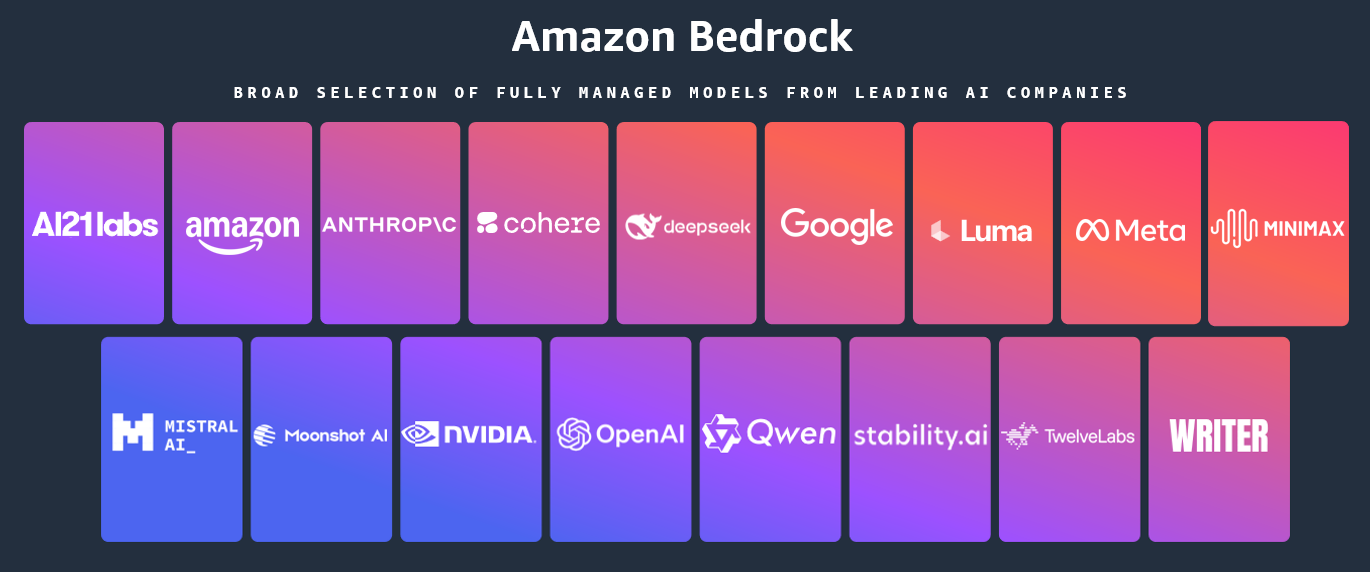
Today, we’re announcing the general availability of an additional 18 fully managed open weight models in Amazon Bedrock from Google, MiniMax AI, Mistral AI, Moonshot AI, NVIDIA, OpenAI, and Qwen, including the new Mistral Large 3 and Ministral 3 3B, 8B, and 14B models.

With this launch, Amazon Bedrock now provides nearly 100 serverless models, offering a broad and deep range of models from leading AI companies, so customers can choose the precise capabilities that best serve their unique needs. By closely monitoring both customer needs and technological advancements, we regularly expand our curated selection of models based on customer needs and technological advancements to include promising new models alongside established industry favorites.

This ongoing expansion of high-performing and differentiated model offerings helps customers stay at the forefront of AI innovation. You can access these models on Amazon Bedrock through the unified API, evaluate, switch, and adopt new models without rewriting applications or changing infrastructure.

New Mistral AI models
These four Mistral AI models are now available first on Amazon Bedrock, each optimized for different performance and cost requirements:

  • Mistral Large 3 – This open weight model is optimized for long-context, multimodal, and instruction reliability. It excels in long document understanding, agentic and tool use workflows, enterprise knowledge work, coding assistance, advanced workloads such as math and coding tasks, multilingual analysis and processing, and multimodal reasoning with vision.
  • Ministral 3 3B – The smallest in the Ministral 3 family is edge-optimized for single GPU deployment with strong language and vision capabilities. It shows robust performance in image captioning, text classification, real-time translation, data extraction, short content generation, and lightweight real-time applications on edge or low-resource devices.
  • Ministral 3 8B – The best-in-class Ministral 3 model for text and vision is edge-optimized for single GPU deployment with high performance and minimal footprint. This model is ideal for chat interfaces in constrained environments, image and document description and understanding, specialized agentic use cases, and balanced performance for local or embedded systems.
  • Ministral 3 14B – The most capable Ministral 3 model delivers state-of the-art text and vision performance optimized for single GPU deployment. You can use advanced local agentic use cases and private AI deployments where advanced capabilities meet practical hardware constraints.

More open weight model options
You can use these open weight models for a wide range of use cases across industries:

Model provider Model name Description Use cases
Google Gemma 3 4B Efficient text and image model that runs locally on laptops. Multilingual support for on-device AI applications. On-device AI for mobile and edge applications, privacy-sensitive local inference, multilingual chat assistants, image captioning and description, and lightweight content generation.
Gemma 3 12B Balanced text and image model for workstations. Multi-language understanding with local deployment for privacy-sensitive applications. Workstation-based AI applications; local deployment for enterprises; multilingual document processing, image analysis and Q&A; and privacy-compliant AI assistants.
Gemma 3 27B Powerful text and image model for enterprise applications. Multi-language support with local deployment for privacy and control. Enterprise local deployment, high-performance multimodal applications, advanced image understanding, multilingual customer service, and data-sensitive AI workflows.
MoonshotΒ AI Kimi K2 Thinking Deep reasoning model that thinks while using tools. Handles research, coding and complex workflows requiring hundreds of sequential actions. Complex coding projects requiring planning, multistep workflows, data analysis and computation, and long-form content creation with research.
MiniMax AI MiniMax M2 Built for coding agents and automation. Excels at multi-file edits, terminal operations and executing long tool-calling chains efficiently. Coding agents and integrated development environment (IDE) integration, multi-file code editing, terminal automation and DevOps, long-chain tool orchestration, and agentic software development.
Mistral AI Magistral Small 1.2 Excels at math, coding, multilingual tasks, and multimodal reasoning with vision capabilities for efficient local deployment. Math and coding tasks, multilingual analysis and processing, and multimodal reasoning with vision.
Voxtral Mini 1.0 Advanced audio understanding model with transcription, multilingual support, Q&A, and summarization. Voice-controlled applications, fast speech-to-text conversion, and offline voice assistants.
Voxtral Small 1.0 Features state-of-the-art audio input with best-in-class text performance; excels at speech transcription, translation, and understanding. Enterprise speech transcription, multilingual customer service, and audio content summarization.
NVIDIA NVIDIA Nemotron Nano 2 9B High efficiency LLM with hybrid transformer Mamba design, excelling in reasoning and agentic tasks. Reasoning, tool calling, math, coding, and instruction following.
NVIDIA Nemotron Nano 2 VL 12B Advanced multimodal reasoning model for video understanding and document intelligence, powering Retrieval-Augmented Generation (RAG) and multimodal agentic applications. Multi-image and video understanding, visual Q&A, and summarization.
OpenAI gpt-oss-safeguard-20b Content safety model that applies your custom policies. Classifies harmful content with explanations for trust and safety workflows. Content moderation and safety classification, custom policy enforcement, user-generated content filtering, trust and safety workflows, and automated content triage.
gpt-oss-safeguard-120b Larger content safety model for complex moderation. Applies custom policies with detailed reasoning for enterprise trust and safety teams. Enterprise content moderation at scale, complex policy interpretation, multilayered safety classification, regulatory compliance checking, high-stakes content review.
Qwen Qwen3-Next-80B-A3B Fast inference with hybrid attention for ultra-long documents. Optimized for RAG pipelines, tool use & agentic workflows with quick responses. RAG pipelines with long documents, agentic workflows with tool calling, code generation and software development, multi-turn conversations with extended context, multilingual content generation.
Qwen3-VL-235B-A22B Understands images and video. Extracts text from documents, converts screenshots to working code, and automates clicking through interfaces. Extracting text from images and PDFs, converting UI designs or screenshots to working code, automating clicks and navigation in applications, video analysis and understanding, reading charts and diagrams.

When implementing publicly available models, give careful consideration to data privacy requirements in your production environments, check for bias in output, and monitor your results for data security, responsible AI, and model evaluation.

You can access the enterprise-grade security features of Amazon Bedrock and implement safeguards customized to your application requirements and responsible AI policies with Amazon Bedrock Guardrails. You can also evaluate and compare models to identify the optimal models for your use cases by using Amazon Bedrock model evaluation tools.

To get started, you can quickly test these models with a few prompts in the playground of the Amazon Bedrock console orΒ use any AWS SDKs to include access to the Bedrock InvokeModel and Converse APIs. You can also use these models with any agentic framework that supports Amazon Bedrock and deploy the agents using Amazon Bedrock AgentCore and Strands Agents. To learn more, visit Code examples for Amazon Bedrock using AWS SDKs in the Amazon Bedrock User Guide.

Now available
Check the full Region list for availability and future updates of new models or search your model name in the AWS CloudFormation resources tab of AWS Capabilities by Region. To learn more, check out the Amazon Bedrock product page and the Amazon Bedrock pricing page.

Give these models a try in the Amazon Bedrock console today and send feedback to AWS re:Post for Amazon Bedrock or through your usual AWS Support contacts.

β€” Channy

Updated on 4 December β€” Amazon Bedrock now supports Responses API on new OpenAI API-compatible service endpoints for GPT OSS 20B and 120B models. To learn more, visit Generate responses using OpenAI APIs.

Amazon FSx for NetApp ONTAP now integrates with Amazon S3 for seamless data access

Today, we’re announcing the ability to access your data in Amazon FSx for NetApp ONTAP file systems using Amazon Simple Storage Service (Amazon S3). With this capability, you can use your enterprise file data to augment generative AI applications with Amazon Bedrock Knowledge Bases for Retrieval Augmented Generation (RAG), train machine learning (ML) models with Amazon SageMaker, generate insights with Amazon S3 integrated third-party services, use comprehensive research capabilities in AI-powered business intelligence (BI) tools such as Amazon Quick Suite, and run analyses using Amazon S3 based cloud-native applications, all while your file data continues to reside in your FSx for NetApp ONTAP file system.

Amazon FSx for NetApp ONTAP is the first and only fully AWS managed NetApp ONTAP file system in the cloud to migrate on-premises applications that rely on NetApp ONTAP or other network-attached storage (NAS) appliances to AWS without having to change how you manage your data. FSx for NetApp ONTAP provides the popular capabilities, high performance, and data management APIs of ONTAP file systems with the added benefits of the AWS Cloud, such as simplified management, on-demand scaling, and seamless integration with other AWS services.

Over the years, AWS has developed a broad range of industry-leading AI, ML, and analytics services and applications that work with data in Amazon S3 that organizations use to innovate faster, discover new insights, and make even better data-driven decisions. However, some organizations want to use these services with their enterprise file data stored in NetApp ONTAP or other NAS appliances.

How to get started
You can create and attach an S3 Access Point to your FSx for ONTAP file system using the Amazon FSx console, the AWS Command Line Interface (AWS CLI), or the AWS SDK.

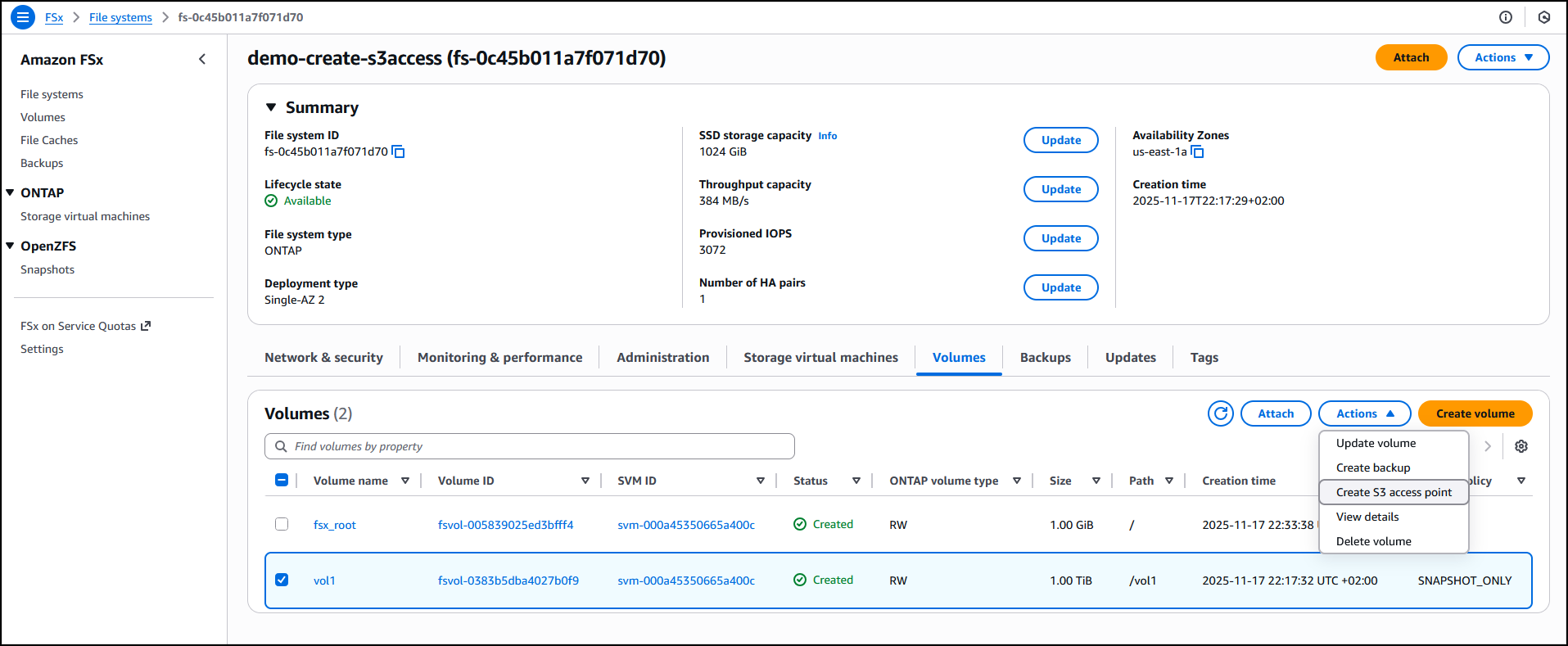
I have an existing FSx for ONTAP file system demo-create-s3access which I created by following the steps in the Creating file systems in the FSx for ONTAP documentation. Using the Amazon FSx console I now choose the file system ID fs-0c45b011a7f071d70 to access the full details of the file system.

I’ll attach the access point to the volume of the file system. I choose the volume vol1 and then select Create S3 Access Point from the Actions dropdown menu.


I enter details such as the access point name, the type of file system user identity and the network configuration, then choose Create s3 Access Point to finalize the process.


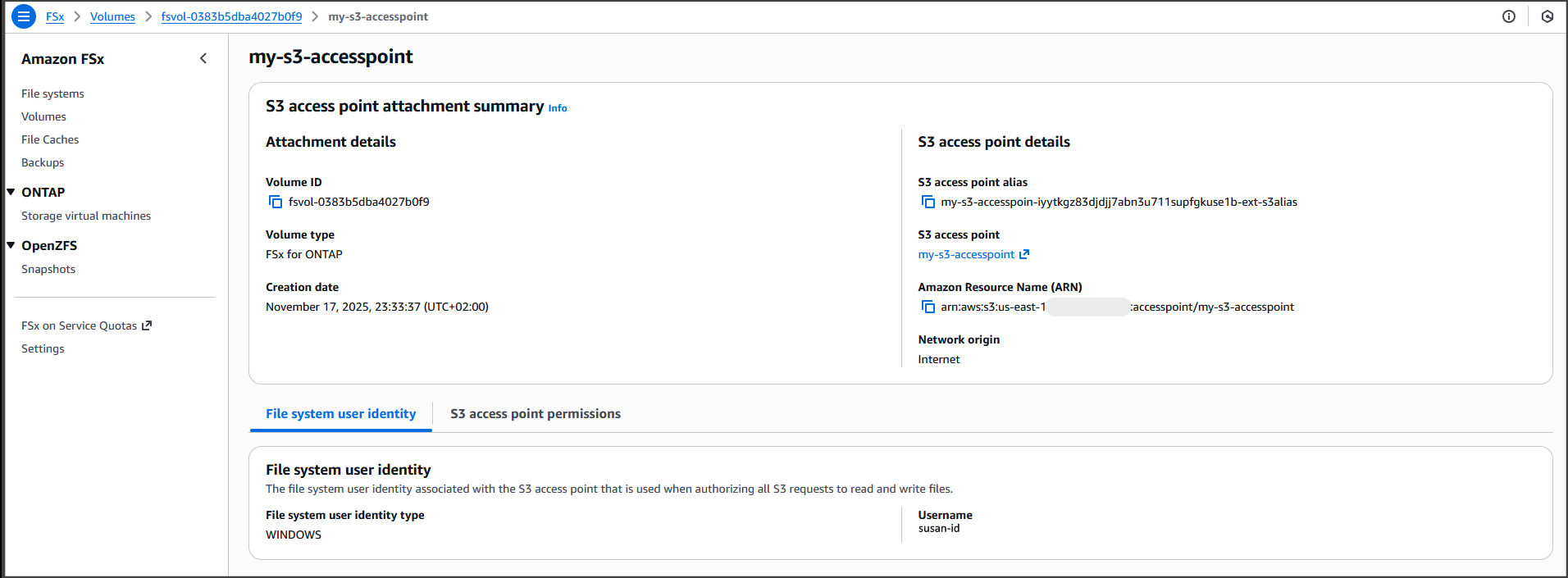
After it’s created, the access point my-s3-accesspoint is ready to allow access to the file data stored in my file system demo-create-s3access from Amazon S3. Amazon Access Points are S3 endpoints that can be attached to Amazon FSx volumes and used to perform Amazon S3 object operations.


I can now bring proprietary data stored in the file system demo-create-s3access to Amazon S3 for use in applications that work with Amazon S3 while my file data continues to reside in the FSx for NetApp ONTAP file system using the access point my-s3-accesspoint (this data remains accessible through the file protocols).

For the walkthrough in this post, I’ll integrate with Quick Suite.

Integrating decades of enterprise file data with the latest AI powered BI tools on AWS
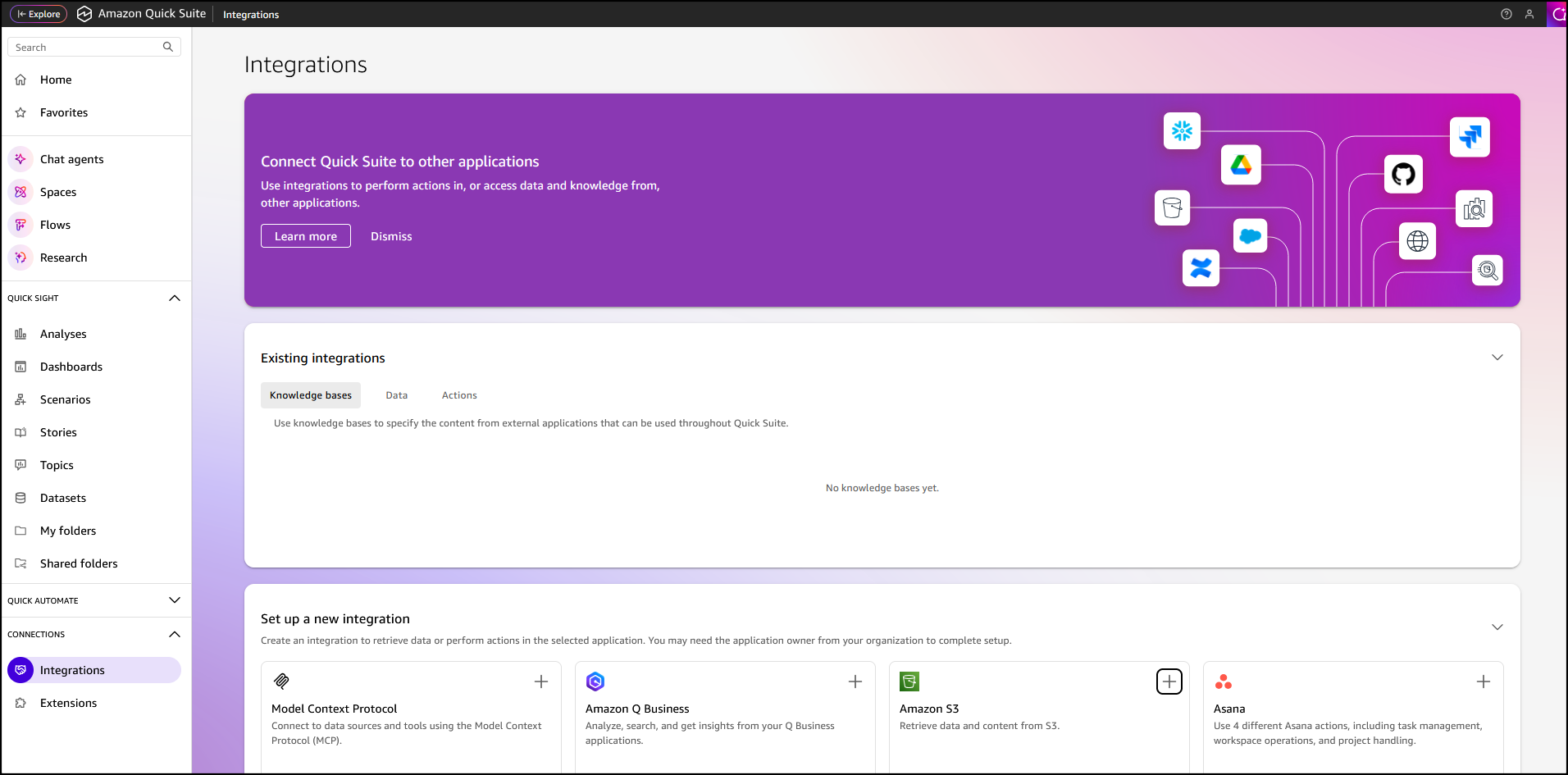
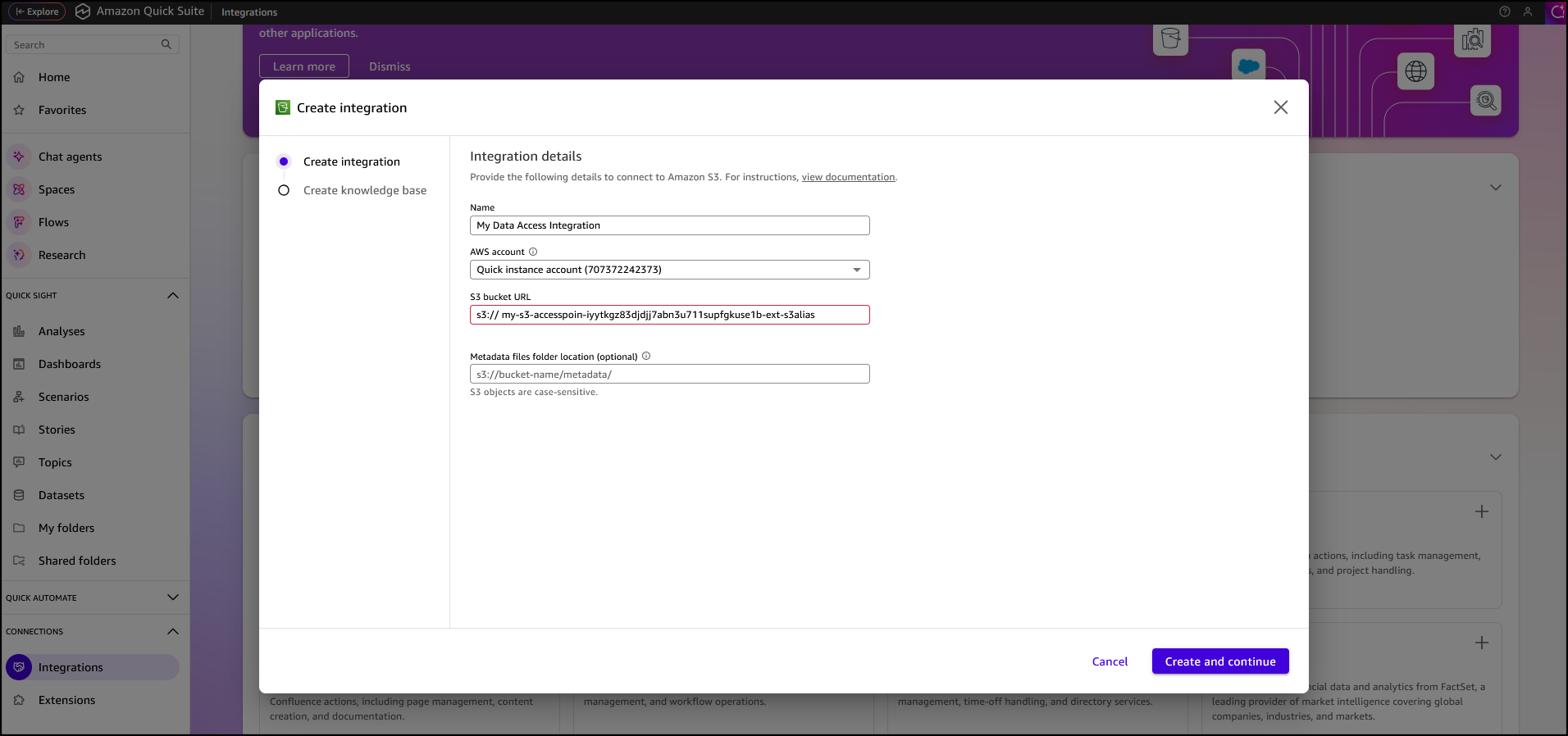
In the Quick Suite Console, in the left navigation pane, I choose Connections, then select Integrations. Before you begin, make sure that you have the correct permissions to the Amazon S3 AWS resource. You can control the AWS resources that Quick Suite can access by following the Amazon Quick Suite user guide.


After I’ve selected the Amazon S3 integration I enter my Amazon S3 Access Point alias as the S3 bucket URL, leave the rest of the information as default, then choose Create and continue.


I finalize the process by providing the Name of the knowledge base, the Description, then choose Create.


After the knowledge base has been created it’s automatically synchronized, it’s now available for interaction.


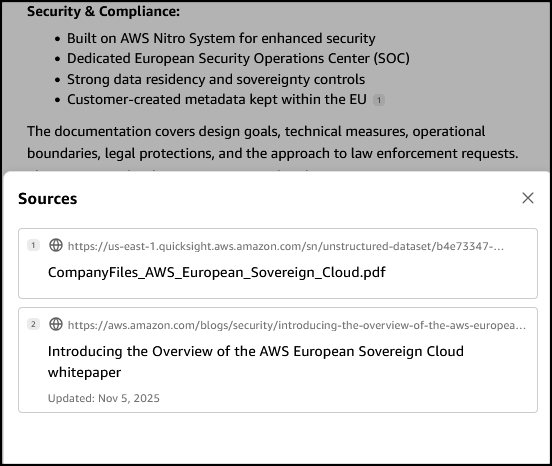
I want to learn more about the AWS European Sovereign Cloud so I’ve updated the file system (accessed through the S3 Access Point my-s3-accesspoin-iyytkgz83djdjj7abn3u711supfgkuse1b-ext-s3alias) with the AWS whitepaper on this topic. In the chat in Amazon Quick Suite. I start asking the first question β€œdo we have any documentation on the europe sovereignty cloud?β€œ. To answer my question, the chat agent accesses and analyzes various types of data sources I have permission to use, including uploaded files in my current conversation, spaces I have access to, knowledge bases from my integrations, and more.

When I verify the source, I see that the document I uploaded to my file system is listed as one of the sources.

Other use cases of Amazon S3 Access Points for Amazon FSx for NetApp ONTAP
Earlier, we looked at use cases such as connecting an organization’s proprietary file data to Amazon Quick Suite for advanced business intelligence. Additionally, Amazon S3 Access Points for Amazon FSx for NetApp ONTAP can be used to seamlessly integrate enterprise file data with comprehensive analytics services, such as Amazon Athena for serverless SQL queries or AWS Glue for ETL processing, to name a few.

Amazon S3 Access Points for Amazon FSx for NetApp ONTAP are also suitable for data access from serverless compute workloads that are cloud-native with containerized microservices that require flexible access to shared enterprise datasets, such as configuration files, reference data, content libraries, model artifacts, and application assets.

Now available
You can get started today using the Amazon FSx console, AWS CLI, or AWS SDK to attach Amazon S3 Access Points to your Amazon FSx for NetApp ONTAP file systems. The feature is available in the following AWS Regions: Africa (Cape Town), Asia Pacific (Hong Kong, Hyderabad, Jakarta, Melbourne, Mumbai, Osaka, Seoul, Singapore, Sydney, Tokyo), Canada (Central, Calgary), Europe (Frankfurt, Ireland, London, Milan, Paris, Spain, Stockholm, Zurich), Israel (Tel Aviv), Middle East (Bahrain, UAE), South America (Sao Paulo), US East (N. Virginia, Ohio), and US West (N. California Oregon). You’re billed by Amazon S3 for the requests and data transfer costs through your S3 Access Point, in addition to your standard Amazon FSx charges. Learn more on the Amazon FSx for NetApp ONTAP pricing page.

PS: Writing a blog post at AWS is always a team effort, even when you see only one name under the post title. In this case, I want to thank Luke Miller, for his expertise and generous help with technical guidance, which made this overview possible and comprehensive.

– Veliswa Boya.

❌